

How to Set Up a Wireless Waiter Calling System in a Restaurant

Introduction
m helps restaurants improve customer service by allowing guests to call staff with the press of a button. The system is commonly used in restaurants, cafes, hotels, bars, food courts, and resorts.
One of the biggest advantages of a wireless waiter calling system is its simple installation. Most systems can be configured without complex wiring or technical expertise.
This guide explains how to install and configure a wireless waiter calling system using table call buttons, watch pagers, and display receivers.
Components Required
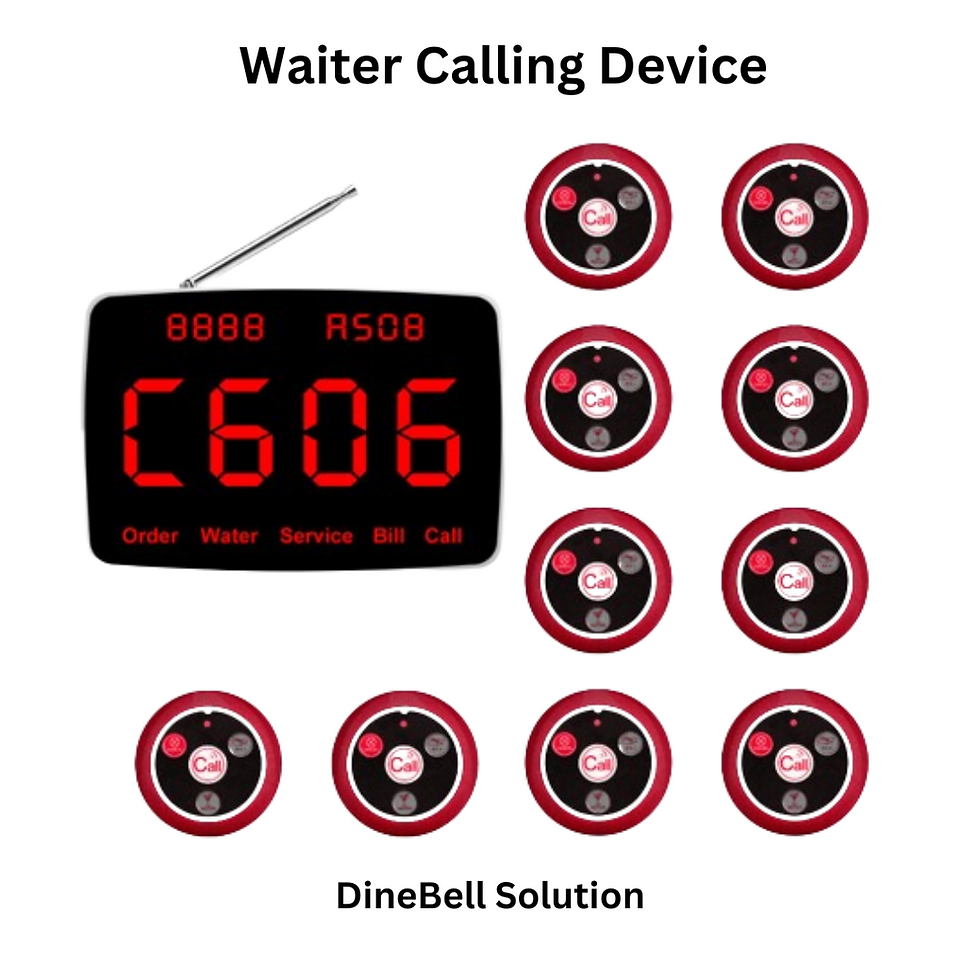
A standard waiter calling system includes:
These buttons are placed on customer tables. Guests press the button whenever they require assistance.
The display receiver shows the table number that has requested service.
Watch pagers allow waiters to receive notifications directly on their wrist.
Step 1: Place the Call Buttons
Install a wireless call button on each table.
Tips:
Place buttons where customers can easily reach them.
Ensure buttons are visible.
Avoid placing buttons near excessive heat or water sources.
Label each button with the correct table number.
Proper placement improves customer usage and service efficiency.
Step 2: Connect the Display Receiver
The display receiver is usually installed at:
Reception desk
Service counter
Kitchen pass area
Cash counter
After powering on the receiver:
Verify that the screen is active.
Check that the receiver is within operational range.
Confirm that all table numbers are programmed correctly.
Step 3: Configure the Call Buttons
Each button must be paired with a corresponding table number.
Typical process:
Enter programming mode on the receiver.
Select the desired table number.
Press the call button.
Save the configuration.
After programming, the receiver should display the correct table number whenever the button is pressed.
Step 4: Configure the Watch Pager
Many restaurants use watch pagers because staff can receive alerts while moving around the restaurant.
Benefits:
Faster response times
Silent operation
Improved staff mobility
Pair the watch pager with the table call buttons according to the system instructions.
After pairing:
Press the call button.
Verify that the watch pager receives the correct table number.
Step 5: Test Every Table
Before opening service:
Press every table button.
Confirm the display receiver shows the correct table number.
Confirm watch pagers receive alerts.
Verify signal coverage throughout the restaurant.
Testing helps identify configuration issues before customers use the system.
Step 6: Configure Display Settings
Most display receivers allow customization such as:
Display duration
Alert duration
Auto-remove settings
Notification options
These settings can be adjusted based on restaurant operations and staff preferences.
Step 7: Train Restaurant Staff
Ensure staff understand:
How alerts are received
How to acknowledge calls
How to respond quickly
How to replace batteries if required
Even a simple training session can significantly improve system effectiveness.
Common Installation Mistakes
Avoid the following mistakes:
Incorrect Table Programming
Always verify that each button corresponds to the correct table number.
Poor Receiver Placement
Receivers should be positioned where alerts can be easily noticed.
Skipping Range Testing
Test the system in all areas including outdoor seating and upper floors.
Ignoring Future Expansion
Choose a system that allows additional tables and receivers to be added later.
Benefits of Proper Setup
A correctly configured wireless waiter calling system helps:
Reduce customer waiting time
Improve service speed
Increase customer satisfaction
Improve staff efficiency
Reduce communication delays
Conclusion
Installing a wireless waiter calling system is straightforward when proper setup procedures are followed. By correctly configuring call buttons, display receivers, and watch pagers, restaurants can provide faster and more efficient customer service.
Whether you operate a restaurant, cafe, hotel, bar, or food court, a properly installed waiter calling system can improve daily operations and enhance the customer experience.
Frequently Asked Questions
Is a wireless waiter calling system difficult to install?
No. Most systems are designed for quick installation and require minimal technical knowledge.
Does the system require Wi-Fi?
No. Most wireless waiter calling systems use dedicated RF communication and do not require internet connectivity.
Can I add more tables later?
Yes. Most expandable systems allow additional call buttons and receivers to be added.
Can watch pagers and display receivers work together?
Yes. Many restaurants use both simultaneously.
How long does installation take?
Most installations can be completed within a short period depending on the number of tables.
Comments